The Silent Problem with Google Ads
Google Ads is the most powerful digital advertising platform in the world. But that power is a double-edged sword: if you don’t set it up correctly, it can burn through your budget at an alarming rate without generating a single customer.
In my experience auditing Google Ads accounts from companies that were “already doing SEM,” I’ve found that between 20% and 40% of the budget is wasted on clicks that were never going to convert. And I’m not talking about small businesses with no experience. I’m talking about accounts spending thousands of euros per month.
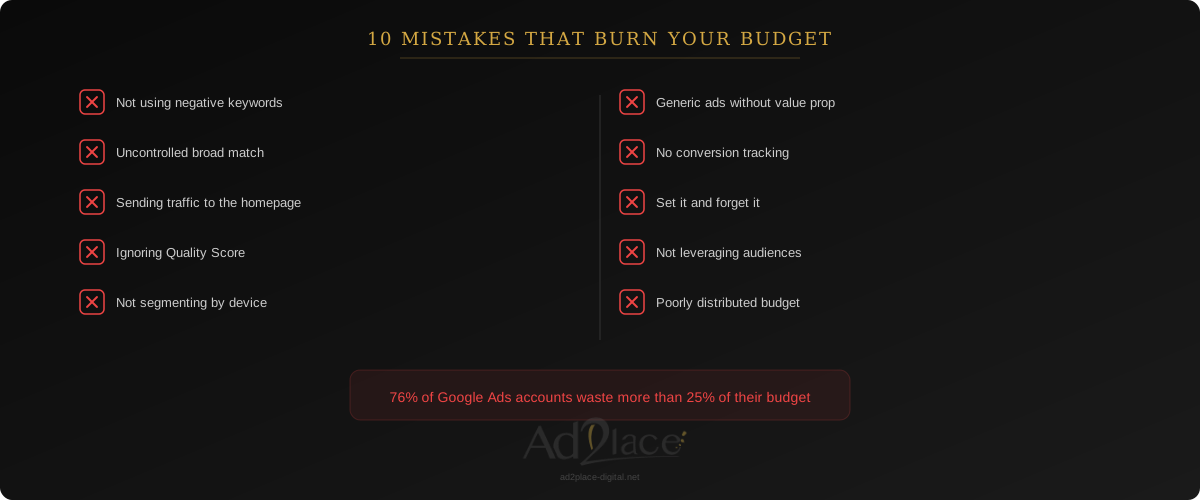
The frustrating part is that most of these mistakes are avoidable. Here are the 10 most common ones and, more importantly, how to fix them.
Mistake 1: Not Using Negative Keywords
This is, without a doubt, the mistake that burns the most money. Negative keywords are the terms for which you do NOT want your ads to appear. Without them, your ad will show up for completely irrelevant searches.
The Problem in Practice
Imagine you sell accounting software for businesses. You have the keyword “accounting software” on broad match. Without negative keywords, your ad can appear for:
- “free accounting software” (people who don’t want to pay).
- “accounting software course” (people who want to learn, not buy).
- “accounting software Excel template” (looking for a free Excel solution).
- “accounting software jobs” (looking for employment, not your product).
Every click on these searches is money thrown away. And with broad match, these irrelevant impressions can represent the majority of your traffic.
How to Fix It
- Review the search terms report weekly. It’s the most reliable source for discovering irrelevant searches triggering your ads.
- Create shared negative keyword lists for the entire account: “free,” “gratis,” “jobs,” “employment,” “course,” “tutorial,” “what is,” “definition.”
- Add industry-specific negatives from day 1. If you sell B2B, exclude B2C terms. If your product is premium, exclude “cheap” and “budget.”
- Establish a routine: spend 15 minutes every week reviewing search terms and adding negatives. This routine alone can save you between 15% and 25% of your budget.
Mistake 2: Relying on Broad Match Without Control
Broad match is the default match type in Google Ads and the one Google pushes hardest. With Smart Bidding, it can work well. Without Smart Bidding or without sufficient conversion data, it’s a recipe for disaster.
The Problem in Practice
With broad match, Google shows your ad for searches it considers “related” to your keyword. But Google’s concept of “related” is often broader than you’d expect. The keyword “business consulting Madrid” could trigger your ad for “MBA Madrid” or “free tax advice.”
How to Fix It
- Start with phrase or exact match until you have enough data about what converts.
- If you use broad match, always combine it with Smart Bidding (Maximize Conversions, Target CPA, or Target ROAS) and a minimum history of 30 conversions per month.
- Monitor search terms more frequently when using broad match. At least twice per week.
- Don’t mix match types in the same ad group. Create separate groups for each type and assign differentiated budgets.
Mistake 3: Sending All Traffic to the Homepage
This mistake is alarmingly common. Many companies create specific ads for specific services but link them all to the homepage. The user searching for “invoicing software for freelancers” lands on a generic page that talks about 15 different products and has to navigate around to find what they’re looking for.
Why It’s a Serious Problem
- Poor user experience: The visitor doesn’t find what they’re looking for and leaves. Your bounce rate skyrockets.
- Low Quality Score: Google evaluates the relevance between the ad and the landing page. If they don’t match, your Quality Score drops, which raises your CPC and lowers your position.
- Minimal conversion rate: Every extra click the user needs to reach the relevant information reduces the probability of conversion. According to 2025 Unbounce data, dedicated landing pages convert 65% more than generic pages.
How to Fix It
- Create specific landing pages for each ad group or, at minimum, for each main service/product.
- Ensure message consistency: The landing page headline should directly reflect what you promised in the ad.
- Include a clear, visible CTA without needing to scroll. The user should know what to do within the first 5 seconds.
- Remove distractions: On a campaign landing page, consider removing the main navigation so the user focuses on the desired action.
Mistake 4: Ignoring Quality Score
Quality Score is the 1-to-10 score that Google assigns to each keyword based on three factors: ad relevance, landing page experience, and expected CTR. A high Quality Score means you pay less per click and get better positions.
The Real Economic Impact
The difference is brutal. A keyword with Quality Score 10 can cost up to 50% less per click than the same keyword with Quality Score 5. With a Quality Score of 3, you could be paying double what your competitor pays for the same position.
Example: If your average CPC is 2 euros with a Quality Score of 5, that same click could cost you 1 euro with Quality Score 10, or 4 euros with Quality Score 3. At 1,000 clicks per month, that’s a 3,000-euro monthly difference.
How to Fix It
- Ad relevance: The keyword should appear in the ad title. Create tight, thematic ad groups (maximum 10-15 closely related keywords) with ads that include those keywords.
- Landing page experience: Fast page (Core Web Vitals in the green), relevant content, optimized mobile design, and clear navigation.
- Expected CTR: Write ads with clear value propositions, specific numbers, and CTAs that create urgency without being misleading. An ad with 8% CTR will always have a better Quality Score than one with 2%.
Mistake 5: Not Segmenting by Device or Location
A campaign that shows the same ads and bids for all devices and all geographic locations is leaving money on the table.
The Problem in Practice
Your product might convert at 5% on desktop and 0.5% on mobile (or vice versa). If you don’t adjust bids, you’re paying the same for clicks that convert 10 times less. The same applies to location: a click from Barcelona might be worth triple one from a city where you don’t offer service.
How to Fix It
- Analyze performance by device in Google Ads reports. If a device converts significantly worse, lower the bid or exclude it.
- Segment geographically at the province or city level. Exclude areas where you don’t operate and increase bids in your key markets.
- Create separate campaigns for mobile and desktop if user behavior differs significantly between them. This gives you independent control over budgets and creatives.
- Review schedules: If your B2B business only receives calls during office hours, there’s no point showing ads with call extensions at 3 AM. Schedule your ads for the time slots that convert.
Mistake 6: Generic Ads with No Clear Value Proposition
An ad that says “We are leaders in our industry. Custom solutions. Contact us now.” tells the user nothing. It’s exactly the same thing all your competitors say.
How to Write Ads That Stand Out
- Include specific numbers: “Save 35% on management costs” is infinitely more persuasive than “Reduce your costs.”
- Address the pain, not the feature: “Stop wasting 4 hours a day on manual tasks” works better than “Business automation software.”
- Differentiate from the competition: If you offer something others don’t (guarantee, free trial, 48-hour implementation), put it in the ad.
- Use ad extensions: Sitelinks, call extensions, location, price, and callout extensions expand your ad, take up more space, and improve your CTR. According to Google data, ad extensions can improve CTR by 10% to 15%.
- Test at least 3 variations per ad group. RSAs (Responsive Search Ads) allow up to 15 headlines and 4 descriptions. Use that capacity.
Mistake 7: Not Setting Up Conversion Tracking Correctly
If you don’t measure conversions, you’re flying blind. And worse: if you measure them incorrectly, you’re making decisions based on wrong data.
Common Tracking Errors
- Not having conversion tracking at all. Sounds basic, but I’ve audited accounts spending thousands of euros monthly with no conversions configured.
- Counting page views as conversions. A visit to the “Thank You” page isn’t a conversion if the form doesn’t require real data.
- Duplicating conversions. If you have the same conversion set up in Google Ads and imported from Analytics, you’re double-counting.
- Not distinguishing conversion types. A user who downloads a PDF doesn’t have the same value as one who requests a quote. If you treat them equally, your Smart Bidding will optimize for the easiest, not the most valuable.
How to Fix It
- Set up Google Tag Manager to centralize all tracking. It’s more reliable and flexible than manually inserting scripts.
- Define primary and secondary conversions. Primary ones (contact requests, purchases) feed Smart Bidding. Secondary ones (downloads, phone clicks) are informational.
- Assign values to conversions. If a lead is worth an average of 500 euros, configure it. This allows Smart Bidding to optimize for value, not just volume.
- Verify tracking monthly. Website changes can break tracking without you noticing. Use Tag Manager’s preview mode to check that everything fires correctly.
Mistake 8: Set It and Forget It
Google Ads is not a set-and-forget channel. Accounts left without supervision degrade quickly: CPCs rise, relevance drops, and conversions fall.
The Minimum You Should Do Each Week
- Monday: Review search terms and add negative keywords (15 minutes).
- Wednesday: Check performance by campaign. Pause ads with low CTR. Adjust budgets based on performance (20 minutes).
- Friday: Review bids and Quality Scores. Identify keywords with low QS and work on improving them (15 minutes).
What You Should Do Monthly
- Complete performance analysis by campaign, ad group, and keyword.
- Review the bidding strategy. If using Smart Bidding, evaluate whether CPA or ROAS targets are realistic.
- Test new ad variations.
- Review landing pages and conversion rates.
- Competitor analysis: have new advertisers appeared? Have sector CPCs changed?
Mistake 9: Not Leveraging Audiences
Many advertisers limit themselves to keyword targeting and completely ignore audiences. This is like fishing with a giant net when you could be using a spear.
Audiences You Should Be Using
Remarketing: Show specific ads to people who have already visited your site. Search remarketing has conversion rates 2 to 3 times higher than standard campaigns. It’s the biggest quick win you can implement.
Customer Match: Upload your client list and create similar audiences. Google will find users with profiles similar to your best customers.
In-market audiences: Google identifies users actively researching products or services in your category. You can add them as observation (to adjust bids) or as targeting (to exclusively reach them).
Affinity audiences: Useful for brand or awareness campaigns. Less effective for direct conversion, but valuable for the top of the funnel.
How to Implement It
- Start with remarketing. Create lists for visitors from the last 30, 60, and 90 days. Increase bids for these audiences in your Search campaigns.
- Exclude converters. If a user is already a customer, don’t show them acquisition ads. Create an exclusion list with users who have completed a conversion.
- Use audiences in observation mode before targeting. This lets you see how different audiences perform without limiting your reach.
Mistake 10: Poorly Distributed Budget Across Campaigns
The last mistake, but not the least important. Many advertisers distribute their budget evenly across all campaigns (“1,000 euros per month, 200 per campaign”) without considering each one’s performance.
The Problem
If your “Invoicing Software” campaign has an 800% ROAS and your “Payroll Software” campaign has a 150% ROAS, giving them the same budget is irrational. You’re artificially limiting the most profitable campaign and overfunding the least profitable one.
How to Fix It
- Calculate the ROAS or CPA of each campaign with at least 30 days of data.
- Redistribute the budget toward the best-performing campaigns. Don’t kill lower-performing campaigns immediately — first try to optimize them.
- Set clear thresholds: if a campaign doesn’t reach a minimum viable CPA after 60 days of optimization, pause it and reassign the budget.
- Use shared budgets with caution. They can be useful, but they can also let a low-performing campaign consume the budget of a profitable one.
- Reserve 10-15% of the budget for experimentation. Test new keywords, audiences, and ad formats in a controlled manner.
Quick Checklist: Audit Your Account in 30 Minutes
If you want a quick review of your Google Ads account, answer these questions:
- Do you have at least 50 negative keywords in your account?
- Do you review search terms at least once per week?
- Does each ad group have its own relevant landing page?
- Is your average Quality Score above 6?
- Is your conversion tracking set up and verified?
- Are you using at least 4 different ad extensions?
- Do you have active remarketing campaigns?
- Do you review and adjust bids at least weekly?
- Do you have separate campaigns by device, or at least bid adjustments?
- Do you distribute budget based on each campaign’s performance?
If you answered “no” to more than 3 questions, there’s a significant opportunity to improve your Google Ads ROI.
Stop Burning Your Google Ads Budget
If you recognize any of these mistakes in your campaigns, or if you simply want to make sure your Google Ads investment is delivering the best possible return, I can help.
With our Google Ads management service we audit your account, identify budget leaks, and optimize every aspect of your campaigns so every euro invested works in your favor.
Request a free consultation and we’ll review the state of your account together with concrete recommendations for improvement.