
What Is an SEO Audit and Why Do You Need One
An SEO audit is a thorough analysis of your website that evaluates all the factors affecting your visibility in search engines. Think of it as a complete medical checkup for your site: you examine the technical structure, content, links, and user experience to detect issues that are holding back your rankings.
In my experience working with dozens of projects, I’ve found that 90% of websites have at least 10 critical technical errors limiting their performance on Google. What’s alarming is that many business owners aren’t even aware of these issues until they carry out a formal audit.
It’s not just about finding errors. A well-executed SEO audit gives you a clear roadmap: it tells you exactly what to fix, in what order, and what impact you can expect from each improvement.
Why Regular SEO Audits Matter
Google updates its algorithm hundreds of times per year. In 2025 alone, more than 12 major updates were confirmed, affecting the rankings of millions of sites. What worked six months ago could be hurting you today.
There are several key reasons you should audit your site on a regular basis:
- Detect traffic drops before they become irreversible. An indexing issue can go unnoticed for weeks if you’re not actively monitoring it.
- Maintain your competitive edge. Your competitors are constantly optimizing. If you don’t review your site, you’ll fall behind.
- Ensure technical health. Migrations, plugin updates, or server changes can introduce errors without you noticing.
- Maximize the ROI of your content. There’s no point publishing excellent articles if your site has crawl issues that prevent Google from finding them.
According to an Ahrefs study published in 2025, 66.31% of web pages don’t receive a single organic visit from Google. In many cases, the root cause is a technical problem that an audit would have caught.
The 7 Steps to a Complete SEO Audit
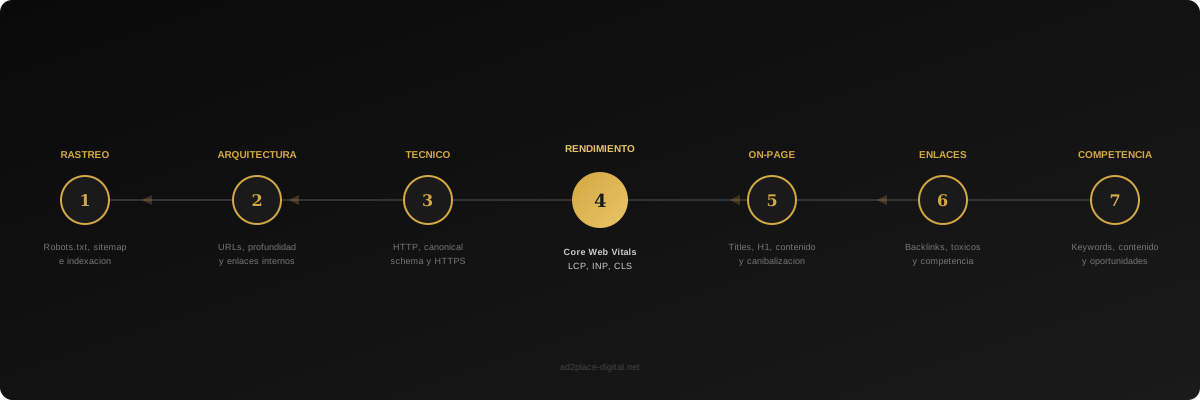
Step 1: Crawl and Indexing Analysis
The first step is understanding how Google sees your website. To do this, you need to verify several fundamental elements.
Start by reviewing your robots.txt file to make sure you’re not blocking important pages. I’ve seen cases where a misconfigured line prevented entire sections of a site from being crawled. Go to yourdomain.com/robots.txt and check that the directives are correct.
Next, review your XML sitemap. It should be up to date, contain no URLs with errors (4xx or 5xx), and be declared in Google Search Console. A clean, up-to-date sitemap speeds up the indexing of your new content.
Also check the indexing status in Search Console. In the “Pages” section, you can see exactly how many URLs are indexed and which ones aren’t, along with the reasons for exclusion. Pay special attention to pages marked as “Crawled — currently not indexed” or “Discovered — currently not indexed.”
Step 2: Website Architecture and URL Audit
Your site’s structure determines how authority flows between your pages and how easily users and bots can find your content.
Analyze these key aspects:
- Crawl depth. No important page should be more than 3 clicks from the homepage. If you have key pages buried at deep levels, Google will assign them less importance.
- URL structure. URLs should be descriptive, short, and contain the main keyword. Avoid unnecessary parameters, numeric IDs, and special characters.
- Internal linking. Every important page should receive internal links from other relevant pages. Identify orphan pages (those with no internal links pointing to them) and fix them.
- Redirect chains. 301 redirects are necessary, but chains of multiple redirects slow down crawling and dilute authority. Remove intermediate hops.
Step 3: Technical Health Review
Here you enter the more technical side of the audit. You need to verify several aspects that directly affect your site’s performance:
HTTP errors: Crawl your entire site with tools like Screaming Frog or Sitebulb. Identify all 4xx (not found) and 5xx (server error) codes. Every broken link is a bad signal for Google and a source of frustration for your users.
Canonical tags: Misconfigured canonicals are one of the most frequent errors I find in audits. Make sure each page points to the correct canonical URL and that there are no conflicts between canonical and noindex directives.
Structured data: Verify that your Schema.org markup is implemented correctly using Google’s Rich Results Test. Well-configured structured data can improve your CTR in search results by 20% to 30%.
HTTPS and security: Your entire site should be served over HTTPS without certificate errors. Check that there’s no mixed content (HTTP resources loaded on HTTPS pages).
Step 4: Performance and Core Web Vitals Analysis
Since Google integrated Core Web Vitals as a ranking factor, web performance is no longer optional. In 2026, with the INP (Interaction to Next Paint) metric now firmly established, user experience carries more weight than ever.
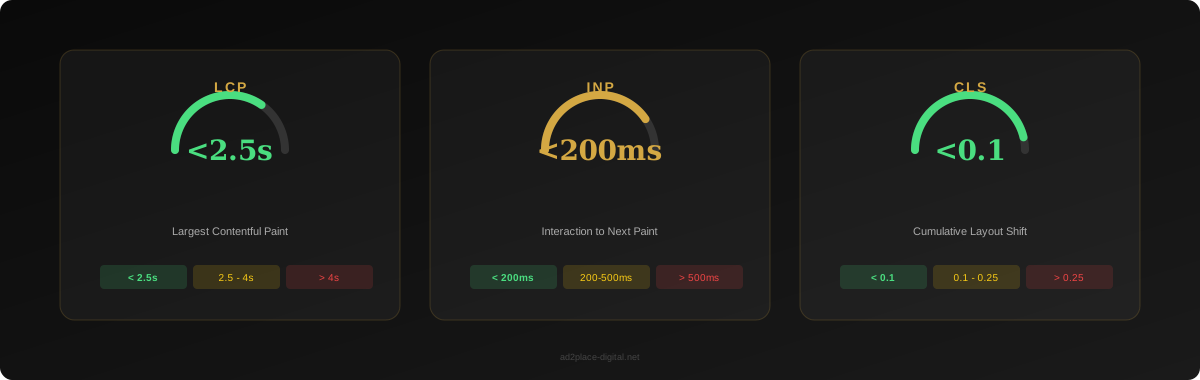
You need to measure and optimize three key metrics:
- LCP (Largest Contentful Paint): The largest visible element should load in under 2.5 seconds. The most common causes of slow LCP are unoptimized images, render-blocking web fonts, and slow servers.
- INP (Interaction to Next Paint): Measures responsiveness to user interactions. The threshold is 200 milliseconds. Heavy or poorly optimized JavaScript is usually the culprit.
- CLS (Cumulative Layout Shift): Unexpected layout shifts during page load should be below 0.1. Images without defined dimensions and late-loading ads are the usual causes.
Use PageSpeed Insights to get field data (real users) and lab data. Field data is what Google uses for rankings, so it’s the most important.
Step 5: On-Page Content Audit
Content remains the pillar of SEO. In this step, evaluate each important page on your site:
Title tags and meta descriptions: Titles should be between 50 and 60 characters, include the main keyword, and be unique for each page. Meta descriptions should be between 120 and 155 characters and include a call to action.
Heading structure: Each page should have a single H1 that includes the main keyword. H2s and H3s should create a logical hierarchy that makes it easy to scan the content.
Content quality and depth: Google rewards content that demonstrates experience, expertise, authoritativeness, and trustworthiness (E-E-A-T). Identify pages with thin content (under 300 words) that add no value and decide whether to improve, consolidate, or remove them.
Keyword cannibalization: Check whether multiple pages on your site are competing for the same keywords. This confuses Google and dilutes your authority. The solution may be to consolidate pages, redirect, or differentiate each page’s focus.
Step 6: Link Profile Analysis
Backlinks remain one of the three most important ranking factors. In this step:
- Analyze the quantity and quality of your backlinks with tools like Ahrefs or Semrush.
- Identify toxic or spammy links that could be hurting you.
- Compare your link profile with those of your direct competitors.
- Review the anchor text distribution. A natural profile has a mix of branded, generic, and keyword-based anchors.
Key stat: A 2025 Backlinko study found that pages in Google’s #1 position have, on average, 3.8 times more backlinks than positions 2 through 10.
Step 7: Competitor Analysis
An audit isn’t complete without looking at what your competitors are doing. Identify your top 5 competitors in the SERPs and analyze:
- Which keywords they rank for that you don’t.
- What type of content performs best for them.
- Where they get their backlinks from.
- What internal linking strategy they use.
This competitive analysis will give you concrete ideas about opportunities you’re missing.
Tools You Need for Your SEO Audit
You don’t need to spend thousands of euros on tools to perform an effective audit. Here’s my selection, organized by budget:
Free Tools
- Google Search Console: Essential. Indexing data, performance metrics, Core Web Vitals, and errors straight from Google.
- Google PageSpeed Insights: For measuring performance and Core Web Vitals with real user data.
- Google Rich Results Test: Verify that your structured data is correct.
- Screaming Frog (free version): Allows you to crawl up to 500 URLs. Sufficient for small and medium sites.
Recommended Paid Tools
- Screaming Frog (full license): Unlimited crawling with advanced features. The industry-standard crawling tool.
- Ahrefs / Semrush: For backlink, keyword, and competitor analysis. Pick one of the two.
- Sitebulb: Excellent for technical audits with very clear visual reports.
My Ideal Setup
For most audits, I use Google Search Console + Screaming Frog + Ahrefs. With these three tools, you cover 95% of what you need to analyze.
Common Mistakes When Performing an SEO Audit
After conducting hundreds of audits, these are the mistakes I see repeated most often:
Focusing only on the technical side and ignoring content. The technical aspects are important, but if your content doesn’t match the user’s search intent, no amount of technical optimization will save you.
Not prioritizing actions. An audit can generate hundreds of recommendations. If you try to fix everything at once, you’ll fix nothing. Classify actions by potential impact and effort required. Always start with high-impact quick wins.
Doing the audit once and forgetting about it. SEO is an ongoing process. I recommend doing a full audit at least every 6 months, with monthly technical check-ups on the most critical aspects.
Ignoring search intent. It’s not enough to detect that a page isn’t ranking. You need to understand whether the format and approach of your content match what Google shows in the results for that query. If Google shows listicles and you have a long-form text article, there’s a mismatch.
Not measuring before and after. Without baseline metrics, you can’t demonstrate the impact of improvements. Before implementing changes, document the current situation: rankings, organic traffic, Core Web Vitals, crawl errors.
When to Hire a Professional
You can do a basic SEO audit yourself by following the steps in this guide. However, there are situations where it makes sense to bring in a professional:
- Your site has more than 500 pages. Technical complexity increases exponentially with size.
- You’ve suffered a penalty or sudden traffic drop. Identifying the cause requires experience and deep knowledge of Google’s updates.
- You’re planning a website migration. Migrations are the most critical moment for SEO. A mistake can cost you months of recovery.
- You don’t have a technical team. Implementing audit recommendations requires web development knowledge.
- You need measurable results and a clear action plan. A professional doesn’t just detect problems — they prioritize them and give you an executable roadmap.
At Ad2Place, we offer an initial free SEO consultation that covers the most critical aspects of your site. It’s a great starting point to understand the current state of your website and decide on next steps.
Next Step: Get Your Free Website Audit
If after reading this guide you want to know how your website is performing, request a free SEO consultation. We’ll analyze the most relevant technical aspects of your site and deliver a report with improvement priorities.
And if you already know you need deeper work, take a look at our professional SEO service where we handle the complete audit, strategy, and implementation.